
Accessible audio tour
Visitors listen on their own phone and read the text along by default. Zooming works, the colours stay readable and the visitor app is built for WCAG 2.2 AA.
What makes an audio tour accessible?
An audio tour is accessible when visitors can read the text along with the audio, enlarge the letters and control the player from a locked screen. The colours also need enough contrast. The Wandrz visitor app is built for WCAG 2.2 AA and we checked 26 of its screens. The full text sits next to the audio by default, so visitors don’t have to switch anything on.
What do visitors notice?
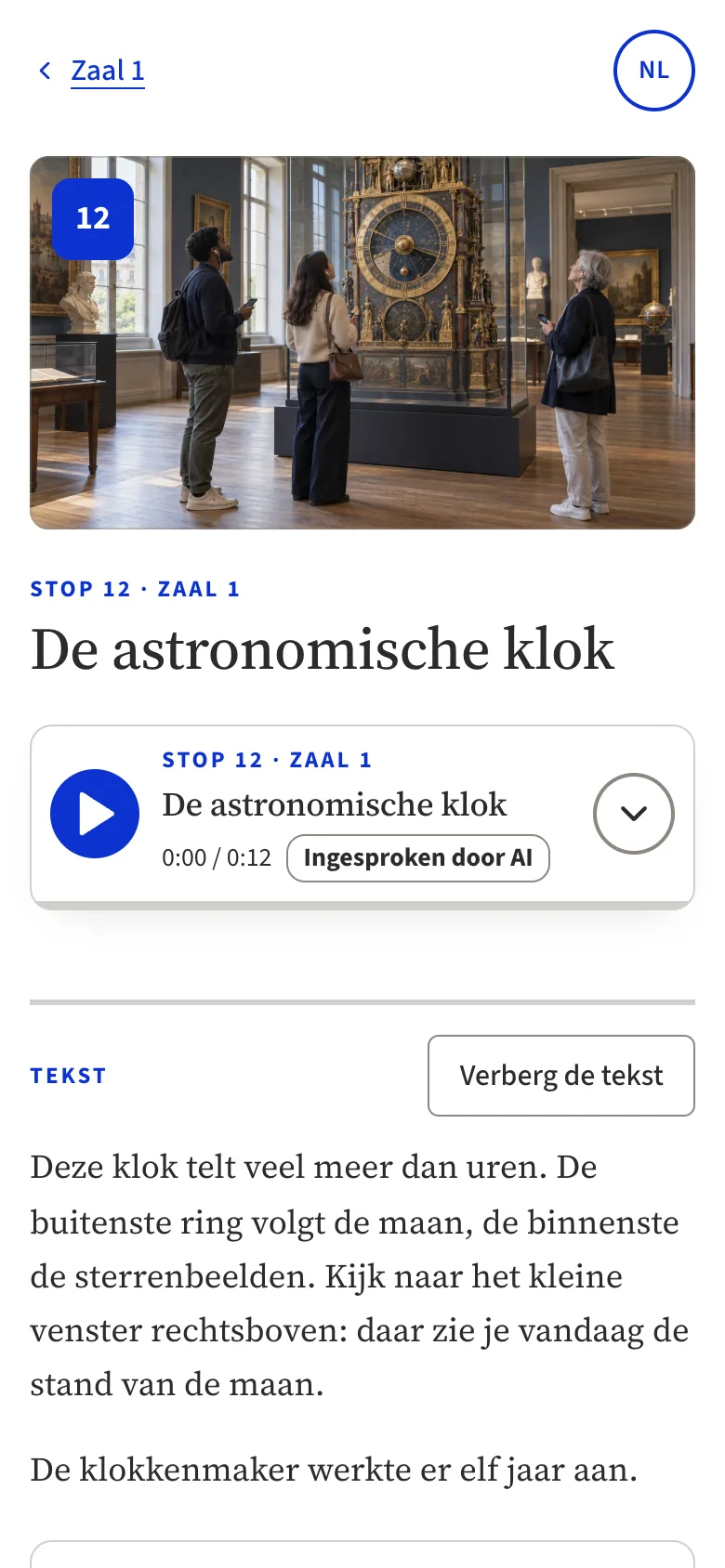
An accessible tour starts with the basics: text with the audio, room to enlarge it and a player you can control in more than one way.
-
The text sits next to the audio
The full text of a stop is shown with the audio by default. Visitors who hear poorly or are still learning the language simply read along.
-
Zoom in and read larger
Zooming in is allowed. The page stays usable at 200% text size and on a narrow screen 320 pixels wide.
-
Controls on the lock screen
The player can also be controlled from the phone’s lock screen.
-
Images with a description
For each image you add alt text per language, for visitors who can’t see the image.
-
Colours that stay readable
If you choose your own brand colours, the dashboard refuses combinations where text and background have less than 4.5 to 1 contrast.
-
Less motion, more contrast
If a visitor’s device is set to reduced motion or a high-contrast mode, the tour respects that.
What has been checked?
We checked 26 screens of the visitor app against WCAG 2.2 AA. Every new version of the visitor app also gets an automatic accessibility check.
- Text contrast of 8.3 to 14.2 to 1 in the default styles
- Text up to 200% larger without the page scrolling sideways
- Layout on a screen 320 pixels wide
- Buttons and fields of at least 44 pixels
- A logical order when using a keyboard
How to write an accessible tour
-
Making an audio tour for visually impaired visitors
How to describe what there is to see and explain the route.
-
Inclusive audio tours for every audience
Who you reach when you look beyond a single audience.
-
An accessible audio tour for non-native speakers
How to write a text that visitors follow well in their second language.
Does your organisation have to meet accessibility rules?
It depends on the country and the type of organisation. These are the rules mentioned most often, each with its source.
-
Dutch public bodies
Must meet EN 301 549, and so WCAG, and publish an accessibility statement. This is set out in the Dutch Besluit digitale toegankelijkheid overheid. It has applied to websites since 2020 and to apps since 2021.
Besluit digitale toegankelijkheid overheid (Staatsblad 2018, 141, in Dutch)
-
Flanders
Flanders has its own rules for digital accessibility. Check with the Flemish government which ones apply to your organisation.
-
The European Accessibility Act
The European Accessibility Act has applied since 28 June 2025 to some consumer services, such as online shops. Micro-enterprises that provide services are exempt.
Whether your organisation falls under these rules depends on its legal status. We can’t judge that for you. What we do: the visitor app is built for WCAG 2.2 AA, and if you publish your own accessibility statement we’re happy to help work out what you can say about the tour.
Questions about accessibility
Is the Wandrz audio tour accessible?
The visitor app is built for WCAG 2.2 AA. We checked 26 screens for contrast, 200% text size, layout at 320 pixels wide, 44-pixel buttons and a logical keyboard order. Every new version also gets an automatic accessibility check. That keeps the tour usable with larger text and on narrow screens.
Can visitors read the text along?
Yes. The full text of a stop is shown with the audio by default, without visitors switching anything on. That helps people who hear poorly, are still learning the language or simply prefer reading. Zooming in works and the page stays usable at 200% text size.
Is the tour suitable for blind and visually impaired visitors?
Audio is the main format, so visitors listen to the story. The player can also be controlled from the lock screen and you add alt text per language to every image. Describe what there is to see in your text too. Our article on audio tours for visually impaired visitors explains how.
Do we have to offer an accessible audio tour?
That depends on your organisation. Dutch public bodies must meet the Besluit digitale toegankelijkheid overheid. The European Accessibility Act has applied since 28 June 2025 to some consumer services, with an exemption for micro-enterprises that provide services. Wandrz can’t judge for you whether these rules apply to you.
Can we use our own brand colours?
Yes, the tour gets your colours, typeface and logo. The dashboard does refuse combinations where text and background have less than 4.5 to 1 contrast, so the text stays readable. You see the result on a phone straight away, before the tour goes live.
Other features
-
Unlimited stops
Your whole collection in one tour, including your exhibitions.
-
Translation: choose from 70+ languages
Every visitor hears the story in their own language.
-
Voices and your own recordings
A suitable voice for each language, or your own recording.
-
GPS triggers
The audio starts by itself at the right spot.
-
Your own branding
Your colours, typeface and logo, on your own address.
-
Management and statistics
Work with your team and see what visitors listen to.
-
Ticket sales
Sell at the front desk, online or through your own ticketing or till system.
Security and privacy taken care of
-
Hosted in the Netherlands
Your data is stored on servers in the Netherlands. Audio and images are stored in the EU.
-
A secure account
Two-step verification, roles and an activity log for your team.
-
No tracking
The tour doesn’t follow visitors and doesn’t build profiles.
-
Accessible
Tested for accessibility against WCAG 2.2 AA.
Want to hear how your tour sounds first?
We’ll make a trial tour of a few stops in a few languages, with your own texts and on a demo link of your own. Or book a 30-minute demo.